Meritodesk
The internal system an app studio runs on: attendance, leave and payroll for the team, and a clear step-by-step pipeline that takes each app update from design to the Play Store.
- Client
- Meritorious Infotech
- Services
- Web application, Desktop app, UI / UX design
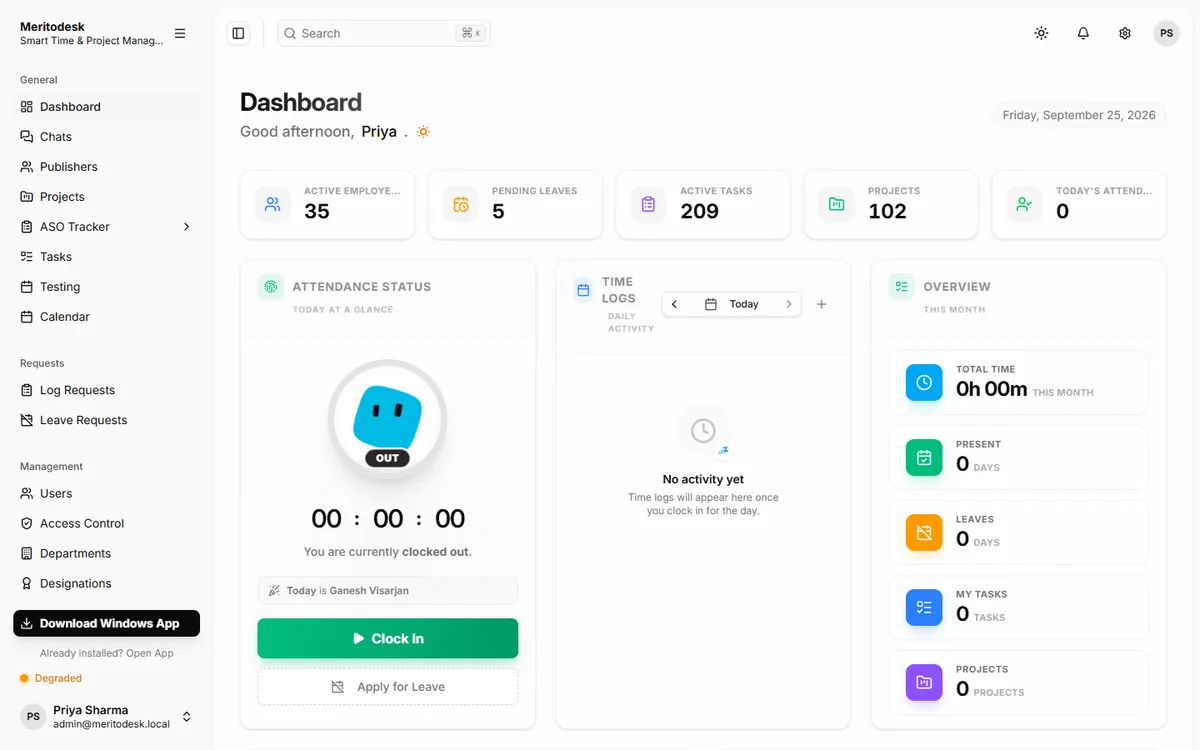
- Clock in and out from the browser or the desktop app
- Attendance, leave and payroll in one place
- Every app update tracked from design to Play Store release
- Work time and app usage tracked by the desktop app
- App ratings and installs synced from the Play Store
- Clear permissions for admins, HR, managers and staff
In short
Meritodesk is the system a team of 30+ people uses every day to run an app studio with 100+ apps: who is working today, who is on leave, and exactly where every app update stands.
The problem
An app studio has two kinds of work to manage. There is the team itself: attendance, leave, working hours and payroll. And there is the product work: every app update passes through designers, developers, testers and managers before it reaches the Play Store. Spread across spreadsheets and chat messages, both were hard to track, and nobody had a single, reliable view.
What I built
One platform for both. It runs in the browser and as a Windows desktop app, and gives each role the view it needs: staff clock in and request leave, HR runs attendance and payroll, and managers follow every app update from start to finish.
How it works
- People clock in and out with one click. The desktop app can also record working time, the applications in use and periodic work screenshots, and it skips screenshots while a private browser window is open.
- Leave requests and attendance corrections go to HR for approval, and a monthly report shows days present, leave taken and hours worked for everyone.
- Each app has its own page that stays in sync with its Play Store listing, including rating, installs and version.
- Every task follows the same path: design, development, testing, approval and release. The right person signs off at each step, and testers file a report before anything ships.
- Permissions decide exactly who can see and do what, so each person only sees what is relevant to them.
The result
The studio runs its people and its product pipeline from one system. Managers can see at a glance who is working and what is shipping, and HR no longer rebuilds attendance and payroll by hand each month.
Behind the scenes
Built with React for the web app, packaged as a Windows desktop app with Tauri, and a NestJS server on MongoDB. Socket.io keeps screens updated live, and web push sends notifications.
Inside the app
01Projects: every app the studio publishes, with its Play Store icon, version, rating and installs kept up to date automatically. 02App page: the store listing, screenshots and release history for one app, with its tasks alongside. 03Tasks: all work in progress, filtered by app, person, team or status. 04Task progress: each task moves from design to development, testing, approval and release, with a sign-off at every step. 05Testing: every test round, who tested it and whether it passed. 06Activity tracker: each person's working sessions for the day, from the desktop app. 07Activity report: hours worked, active time and apps used, hour by hour. 08App usage: how the working day was spent across applications. 09Work screenshots: periodic captures from the desktop app, with a timeline for the day. 10Attendance report: days present, leave taken and hours worked, per person, per day. 11Team calendar: holidays, leave, birthdays and work anniversaries in one view. 12Leave requests: full-day, half-day or hourly leave, approved or declined by HR. 13Team: everyone's role, department and joining date. 14Departments: how the company is organised. 15Permissions: exactly who can see and do what, set per role.